Face recognition
This Use Case is available with the Pro Licence.
Face recognition allows you to search for faces in videos, enabling you to identify individuals based on their facial features. The query is based on a pre-trained model that detects faces in images and videos, and matches them against a set of known faces provided in an watchlist.
Face recognition works on a single or multiple videos, and can be used to recognize people in real-time or in recorded footage. It is particularly useful for security and surveillance applications, where identifying individuals is crucial.
Currently, the whole content of a watchlist is used by Face recognition - running a query for an watchlist with more than one entities will produce results for all entities it contains. If you want to detect a specific person, create a separate watchlist containing images for that person only.
Prerequisites
- At least one watchlist has been created.
Go to Investigation Advanced search to set up a Search for stopped objects.
Select Source
Select the video you want to run the Search on from the left sidebar. The thumbnail image of the chosen video is displayed here.
Time interval Advanced search only
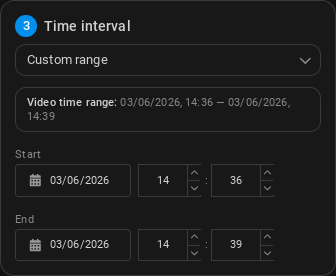
Select a time frame for the analytics to run.
- Entire video: Run the Search on the entire video duration, from the start timestamp to the end timestamp (set during video registration).
- Custom range: You can select a custom start and end date and time to run the Search on. Type the desired date and time or select them by clicking the calendar icon.
Face recognition settings
-
Watchlist: Select an watchlist from the dropdown menu to use as a watchlist for face recognition. The query will search for faces in the video that match any of the faces in the selected watchlist.
-
Face match strictness (Strict by default): The strictness level of the Search. The higher the strictness, the more likely it is to detect faces that match the watchlist, but it may also result in more false positives.
-
Minimum time between results (in seconds, 30 by default): No additional events will be generated during this cooldown period.
Integration Live analytics only
You can choose to integrate the Search with an alarm system.; whenever a stopped object is detected, an alarm will be triggered in the integrated system.
-
Alarm cooldown: (in seconds, 10 by default) The minimum amount of time that must pass between two detections before an alarm can be triggered again.
-
Alarm integration: Choose from the list of available integrations. The following integrations are available to be created in Integrations:
Results
All done - Clicking Search will immediately start the analysis and opens the Search Results screen.