Free text search

Free text search is a versatile tool that allows you to search for objects in videos based on text input (currently in English). It uses text input to filter results - the more specific the text, the more accurate the results.
Free text search works on a single or multiple videos.
-
Open to Investigation on the top bar select Free text search.
-
Select one or multiple Videos or folder(s) on the left sidebar type your text prompt.
Running Free text search on the Workspace root folder will search all videos in the workspace.
-
(optional) Click the icon to open the full configuration menu and adjust these parameters as needed.
Search parameters
The analysis will run on the following default parameters:
- Object types: Person and all vehicle object types, as well as the full image background (not limited to detected object types).
- Time frame: the last 3 hours.
Clicking the icon opens the full configuration menu and allows you to adjust these parameters as needed.
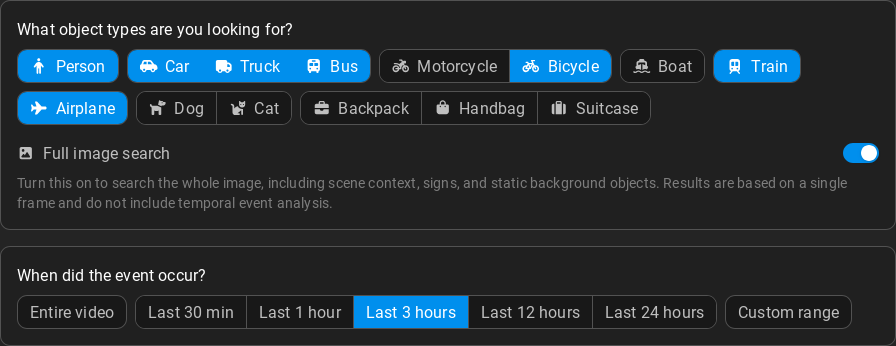
-
Click to start the analysis.
Recommendations
- Do not use negation in the search text; i.e. "person not sitting" will not produce correct results.
- Combine multiple attributes in a single search to get more accurate results, e.g. "person sitting and looking at their phone".
- Make sure to pick the object type corresponding to your search text to get the desired results - if your search is e.g. "stationary car next to a bicycle", select the Car and Bicycle object types.