Face finder
Finds people whose face matches an uploaded reference image. Adjust face match strictness to balance missed matches against false alarms.
Go to Investigation Advanced search to set up a Search for face matches. Alternatively, go to Live analytics New live analytics rule to set up a real-time detection of face matches with alarm integration.
Select Source
Select the video you want to run the Search on from the left sidebar. The thumbnail image of the chosen video is displayed here.
Time interval Advanced search only
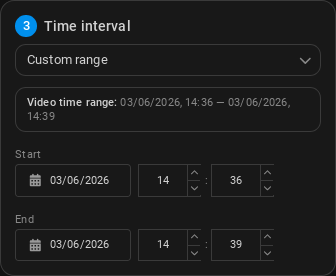
Select a time frame for the analytics to run.
- Entire video: Run the Search on the entire video duration, from the start timestamp to the end timestamp (set during video registration).
- Custom range: You can select a custom start and end date and time to run the Search on. Type the desired date and time or select them by clicking the calendar icon.
Face recognition settings
-
Image containing a face: Upload an image file containing the face of the person you want to find. The image should be clear and well-lit, with the face facing the camera for best results.
-
Face match strictness (Strict by default): The strictness level of the Search. The higher the strictness, the more likely it is to detect faces that match the reference image, but it may also result in more false positives.
Alarm integration Live analytics only
You can choose to integrate the Search with an alarm system.; whenever a stopped object is detected, an alarm will be triggered in the integrated system.
-
Alarm cooldown: (in seconds, 10 by default) The minimum amount of time that must pass between two detections before an alarm can be triggered again.
-
Alarm integration: Choose from the list of available integrations. The following integrations are available to be created in Integrations:
Results
All done - Clicking Search will immediately start the analysis and opens the Search Results screen.
Live analytics will produce real-time detections , and the results will be displayed in the Alarms screen. If an alarm integration is set up, an alarm will also be triggered in the integrated system.